MARK HRiS HRMS

Everyday HR.
Beautifully organised.

Employee records, leave, attendance, claims, documents and eForms — in one secure, web-based system, with self-service and approvals built in. Choose the modules your organisation needs.

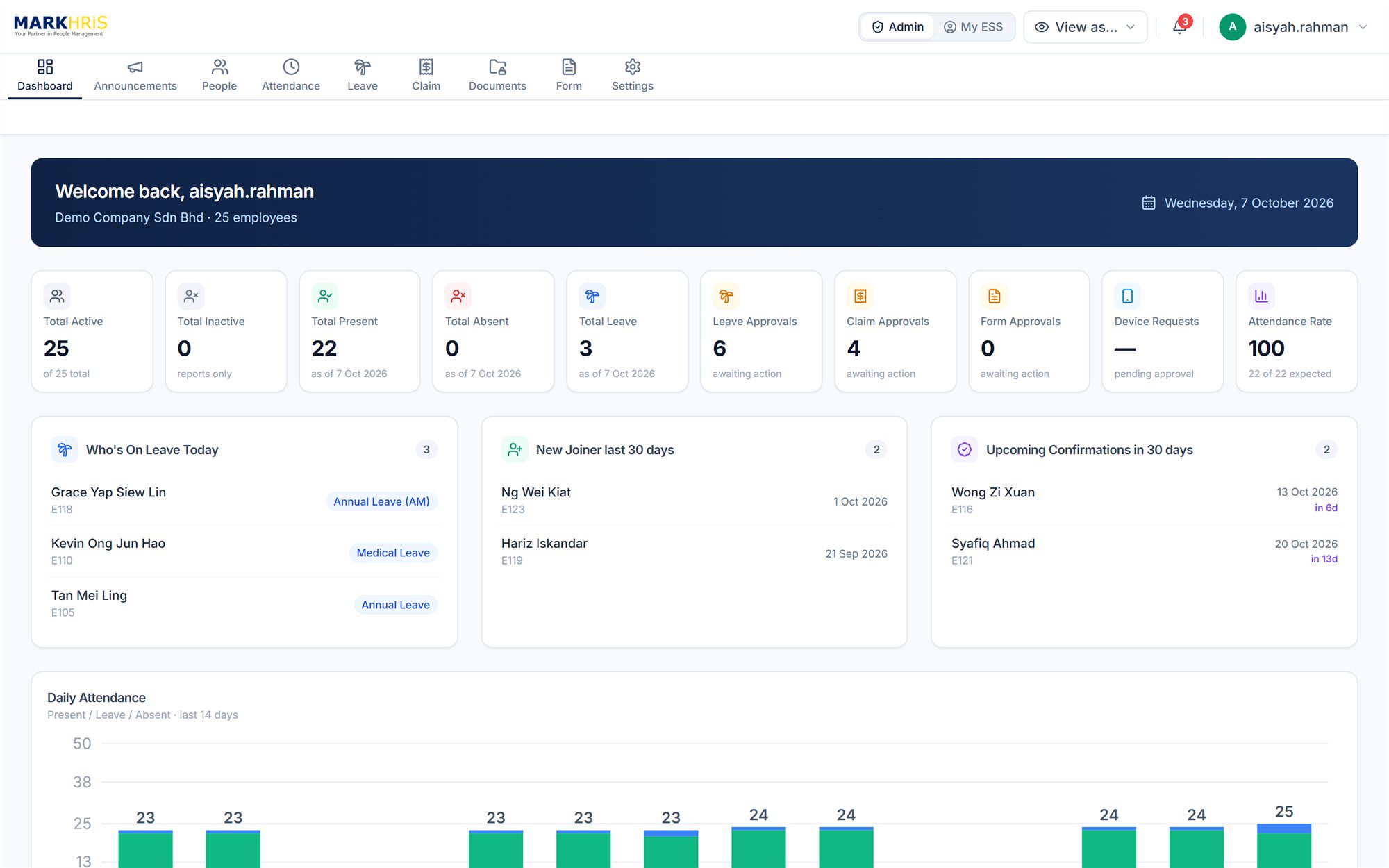
MARKHRiS HRMS admin dashboard showing headcount, attendance, leave and approval summaries
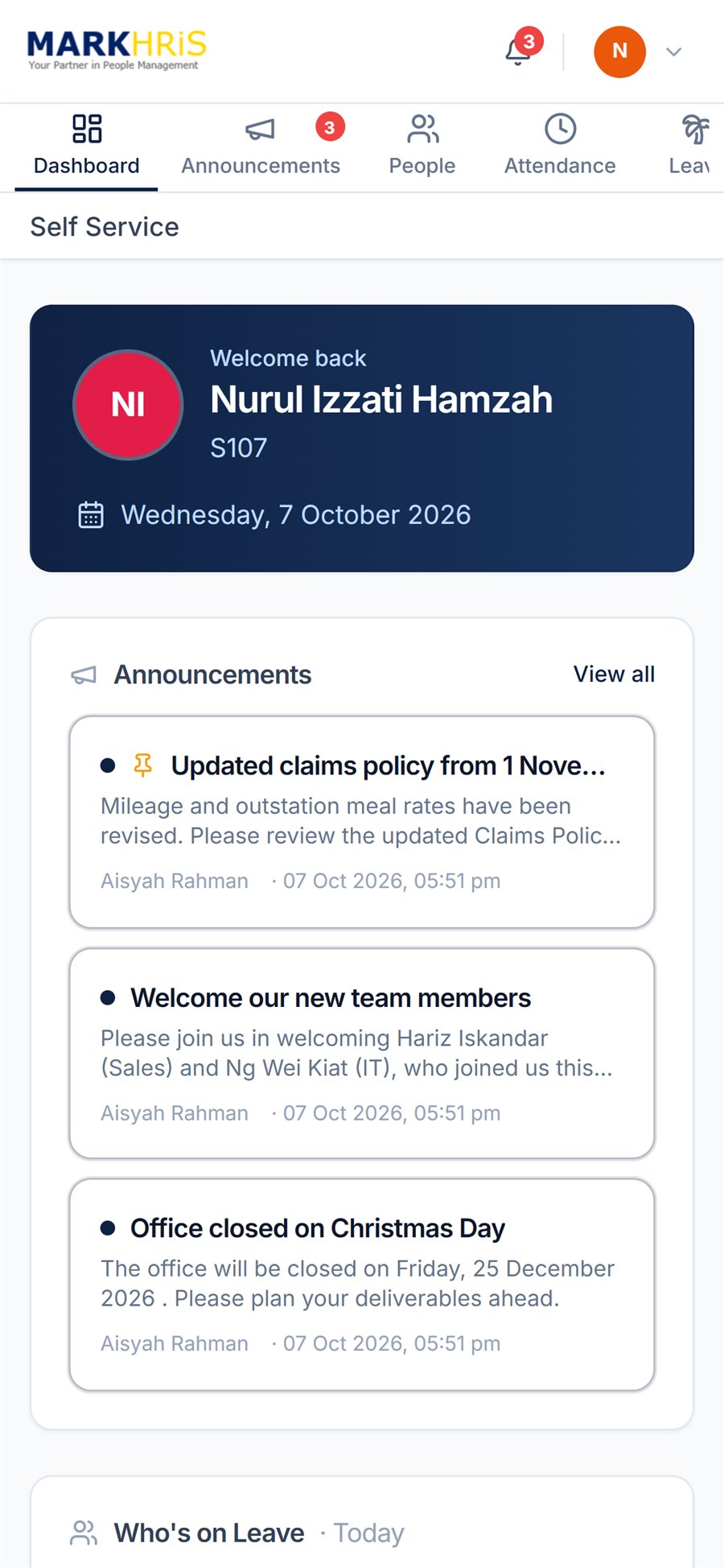
MARKHRiS HRMS employee self-service home screen on a phone

Screens shown with sample demonstration data.

Choose your modules

Start with what you need.
Add more as you grow.

Employee Management is the foundation. Add Leave, Attendance, Claims, Documents and eForms as your organisation needs them.

01 · Core

Employee Management.

A complete, well-organised record for every employee — the foundation for every other HRMS module.

  • Personal, job and family details in one employee profile
  • Organisation structure by branch, division, department and section, with job grade, category, position and cost centre
  • Additional fields you can label to suit your organisation
  • Bulk updates with change history
  • Employee change requests submitted through self-service and approved before they take effect
  • Support for employees working across multiple companies in your group
  • Employee data import using the MARKHRiS Excel template
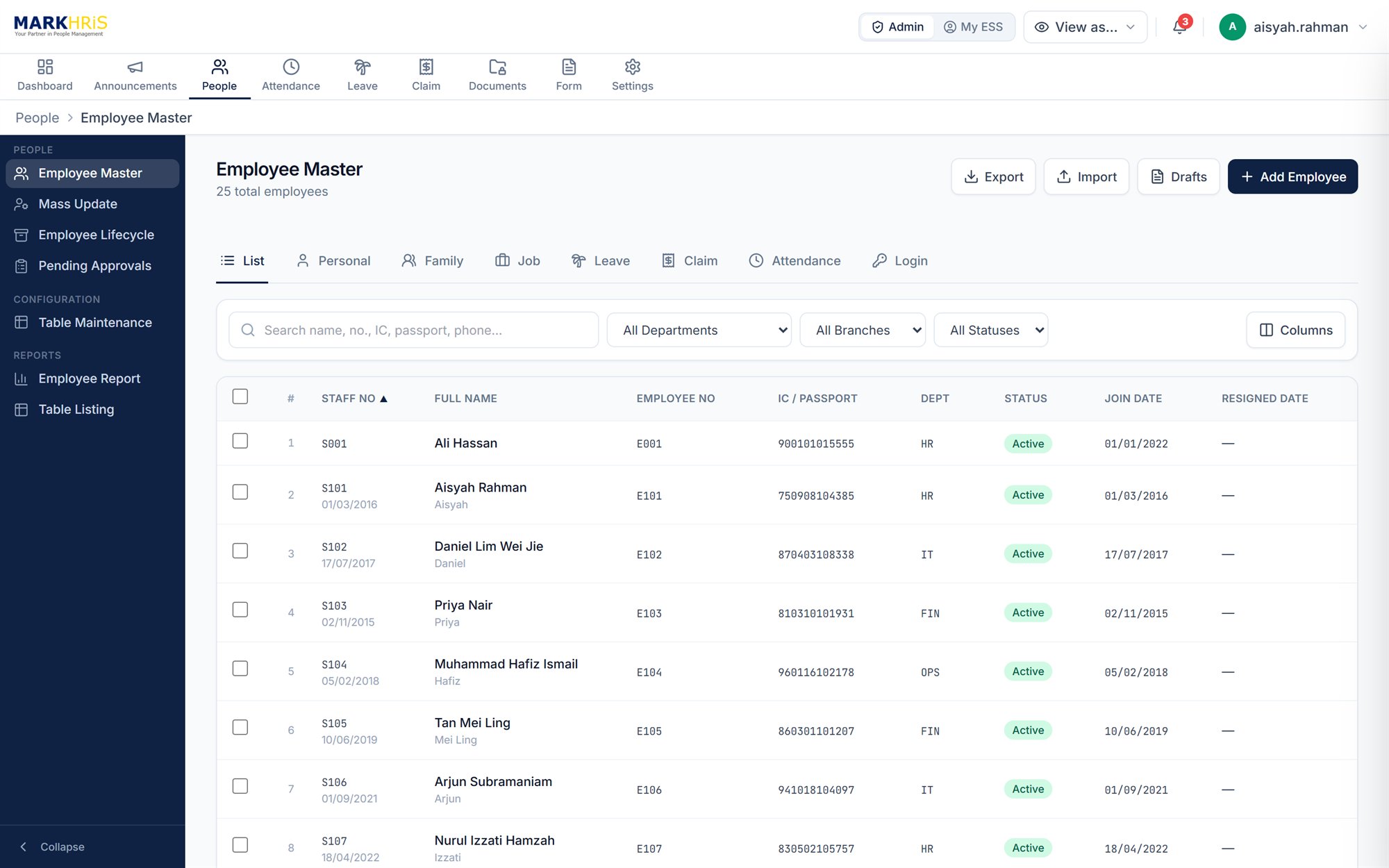
Employee Master list in MARKHRiS HRMS
02 · Module

Leave Management.

Set up your leave policy once and let the system apply it consistently — for every employee, every year.

  • Configurable leave types: paid or unpaid, full-day, half-day (AM/PM) or hourly
  • Entitlement by years of service, with pro-rating for new joiners and leavers
  • Year-end carry-forward with limits and expiry, forfeiture or encashment
  • Replacement leave and time-off-in-lieu, with expiry
  • Rules for notice periods, backdated applications and required attachments
  • Up to five approval levels, with reminders, auto-approval and approver delegation
  • Leave withdrawal by employees and recall by HR
  • Leave calendar, analysis reports and customisable email notifications
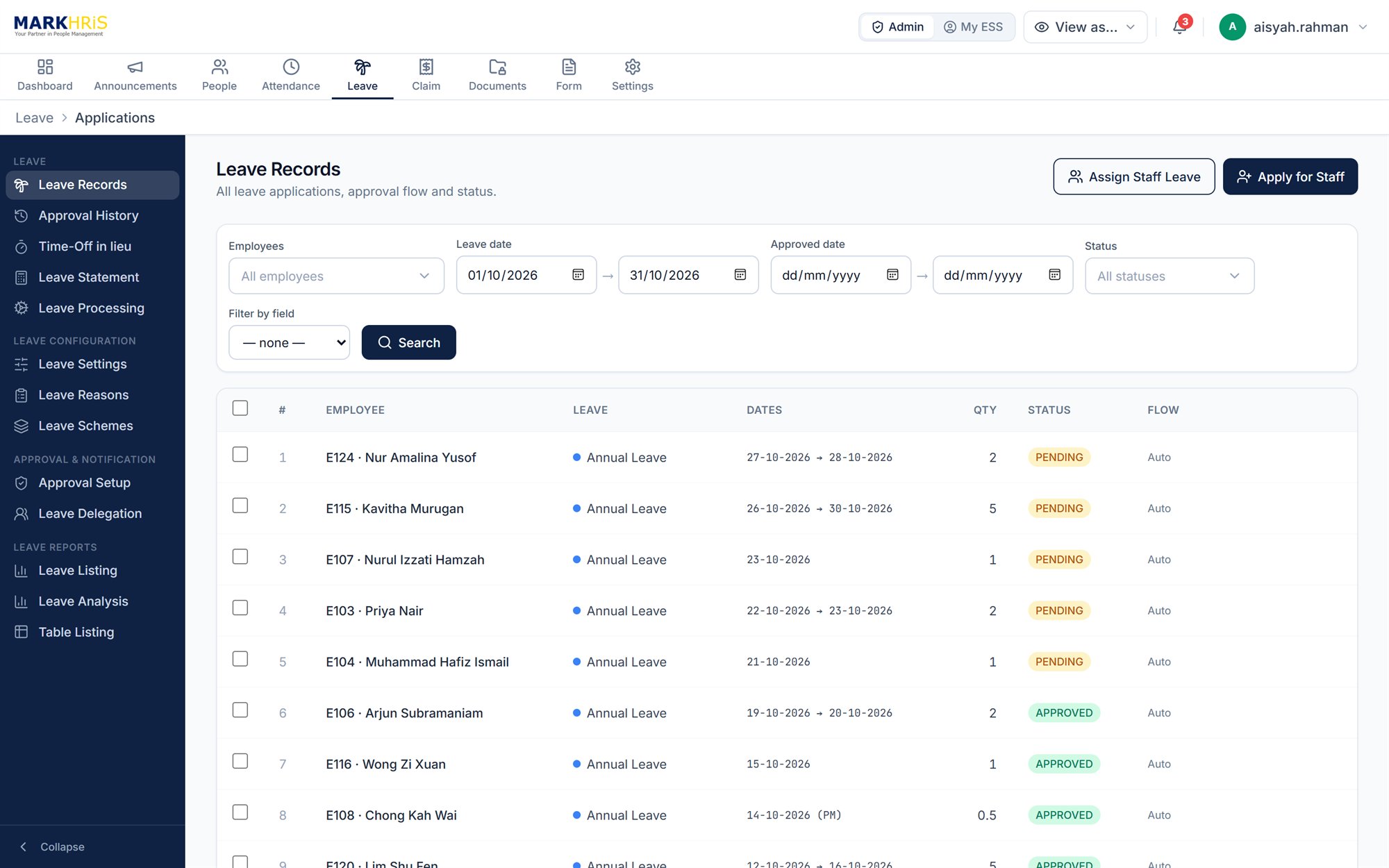
Leave Records with pending and approved applications in MARKHRiS HRMS
03 · Module

Attendance & Overtime.

Capture time accurately — from the office, the field or your existing terminals — and keep overtime under control.

  • Clock in and out from the self-service portal, with GPS geofencing for approved work locations
  • Optional fingerprint or face verification on supported devices
  • Flexi mode to record client or site visits
  • Import clock data from time-attendance terminals by file upload or scheduled import
  • Work patterns, duty rosters and duty rescheduling
  • Holiday calendars, special working days and special off days
  • Overtime planning and approval, with overtime policies by work group
  • Late-in and early-out tracking, attendance correction requests and monthly reports
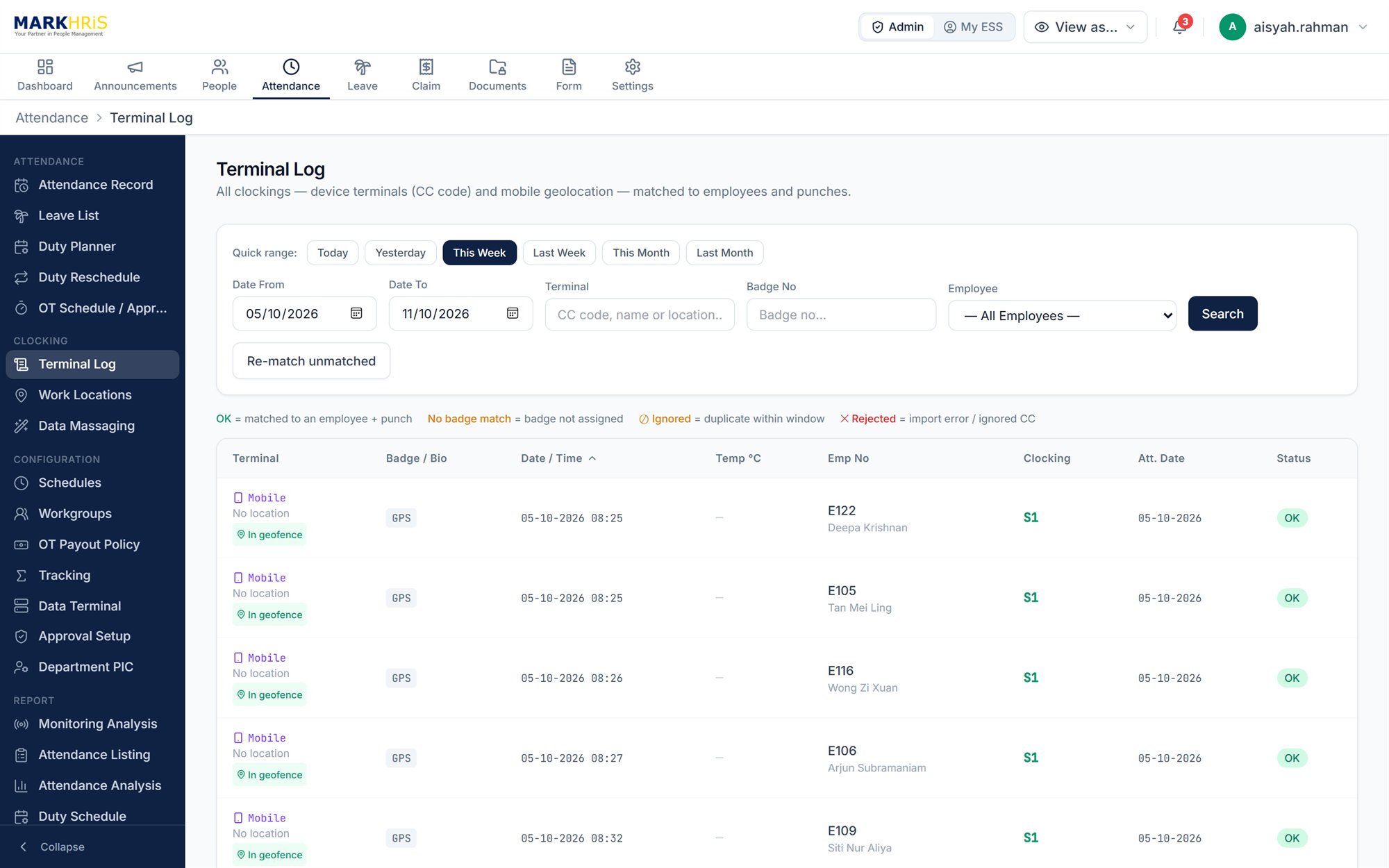
Attendance terminal log with geofenced mobile clock-ins in MARKHRiS HRMS
04 · Module

Claims.

Give employees a simple way to claim, and give approvers everything they need to decide.

  • Expense groups, types and schemes, with yearly entitlements or straight reimbursement
  • Claim by amount, days, hours or units
  • Limits at actual amount, or fixed rates such as mileage per kilometre
  • Multi-currency claims with exchange rates
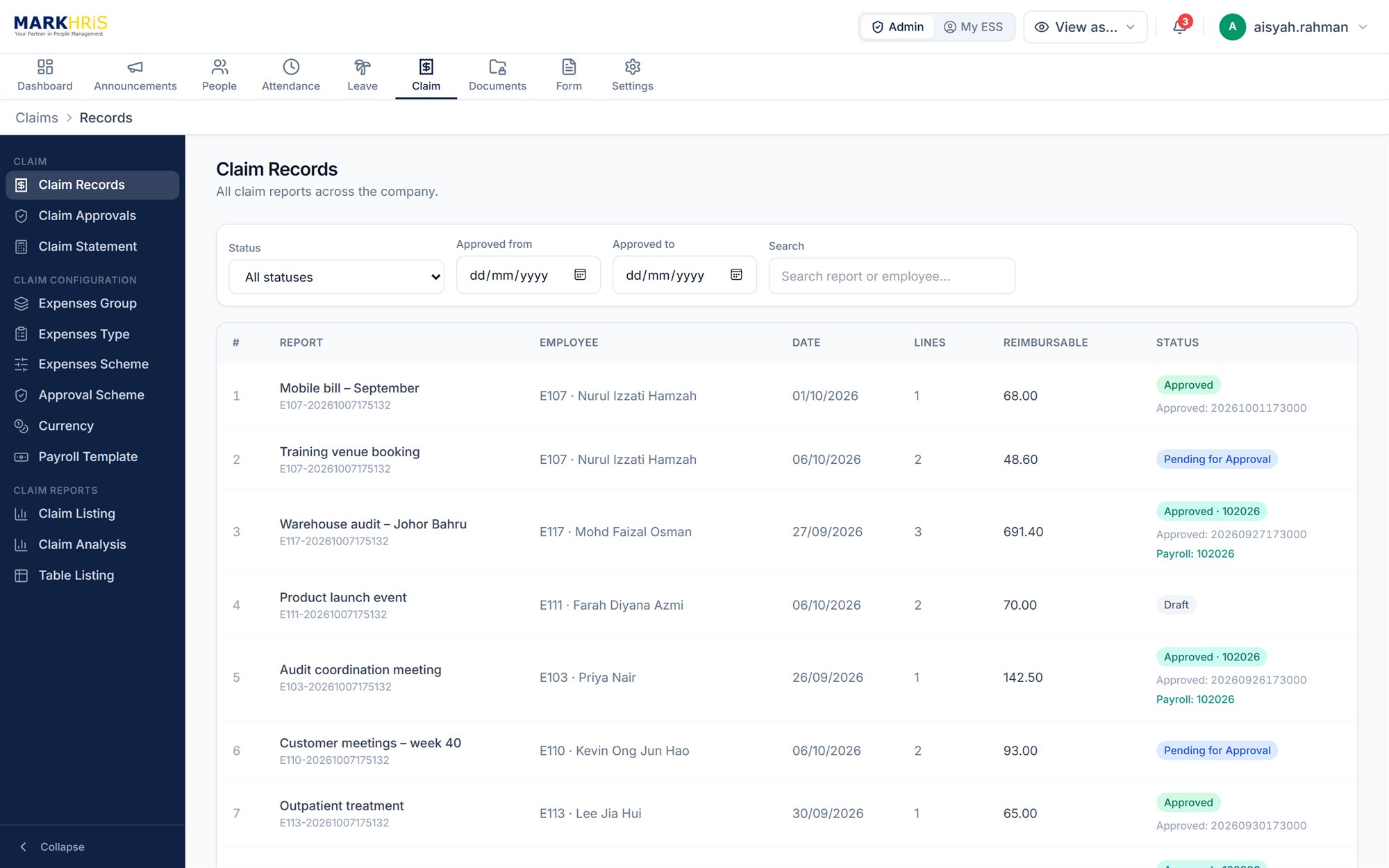
  • Multi-level approval, claim statements and analysis reports
  • Approved claims mapped to payroll pay codes for export
Claim Records with approval and payroll status in MARKHRiS HRMS
05 · Module

Documents & eForms.

Share the right documents with the right people, and turn paper forms into digital workflows.

  • Shared company documents for policies, handbooks and notices
  • Personal employee documents protected with AES-256 encryption, with scheduled release
  • Bulk payslip and EA form PDF upload — each file matched to the right employee automatically
  • Document audit trail
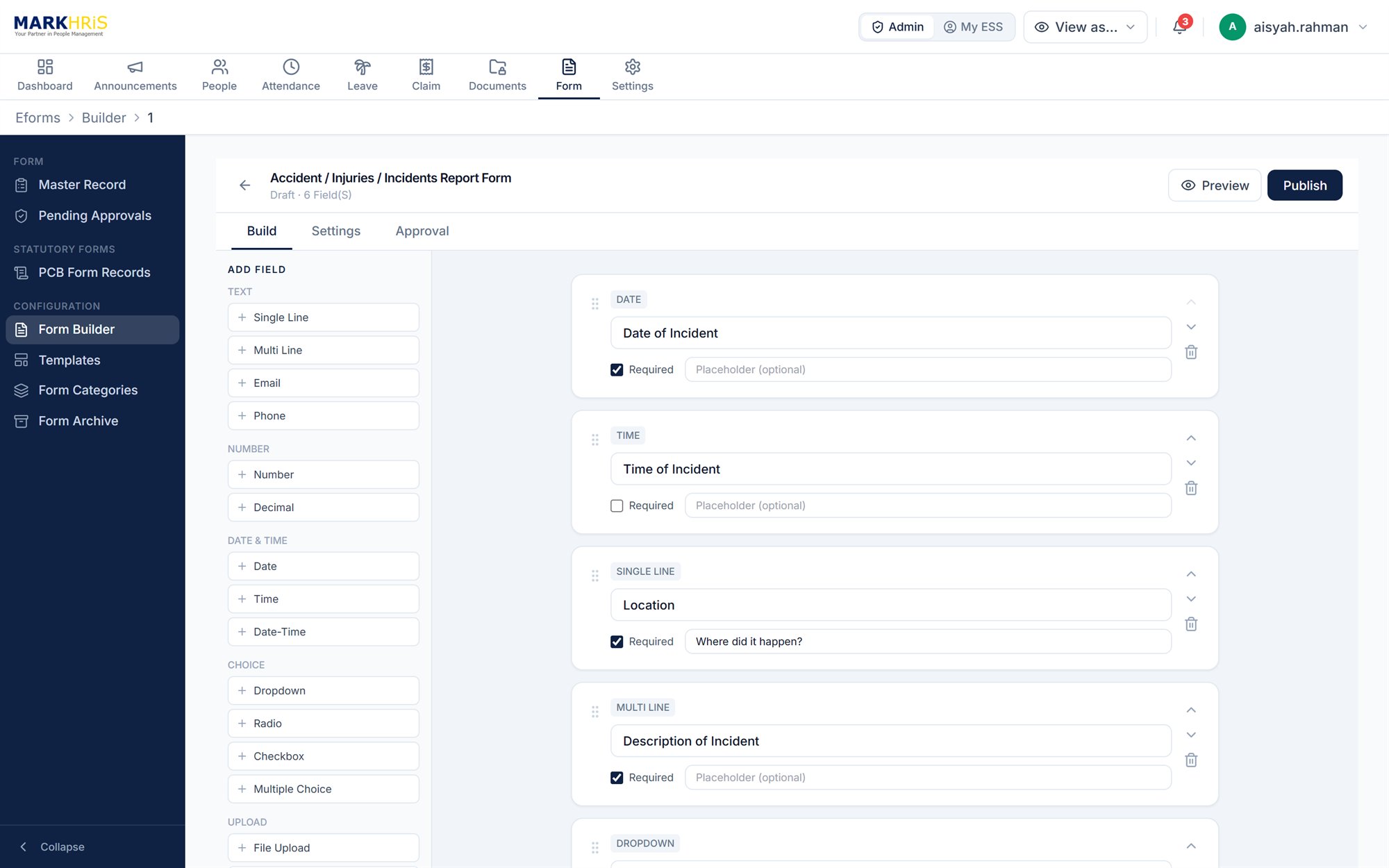
  • eForm builder with a template library, approvers, a submissions archive and PDF output
eForm builder editing an incident report form in MARKHRiS HRMS
Employee self-service

HR in every employee's pocket.

The self-service portal works in any modern browser on desktop or mobile, and can be added to the home screen of a phone.

  • Clock in and out, and view attendance records
  • Apply for leave and view the leave calendar
  • Submit claims and track their status
  • View payslips, EA forms and other documents
  • Request updates to personal and family details
  • Read company announcements and complete eForms
  • Submit LHDN PCB TP1 and TP3 forms
MARKHRiS HRMS employee self-service home screen with announcements on a phone

One place for approvals

Approvers see every pending leave, claim and attendance request in a single view, with multi-level approval chains.

Notifications that keep things moving

In-app notifications and email templates for each module keep employees and approvers informed at every step.

Company announcements

Publish announcements to selected groups of employees and see who has read them.

Security & control

The right access for every role.

Built-in controls help protect sensitive employee information and keep a clear record of what changes.

Role-based access

Six role levels — from system administrator to employee — with detailed permissions for each.

Two-factor & passkey sign-in

Two-factor authentication, plus passkey sign-in with fingerprint or face on supported devices.

Device registration

Register devices and approve them before they can be used to access the system.

Login monitoring

Password policies, a list of active logins and tracking of sign-in attempts.

Audit log

A record of key system activity, for accountability and review.

Policy acceptance

Users accept the current Terms of Use and Privacy Policy, with each acceptance recorded.

Works with ePayroll

From approval to payroll, without retyping.

Approved leave, overtime hours and claims are exported by pay month in the MARKHRiS Payroll format, with claims mapped to your payroll pay codes — ready to import into MARKHRiS ePayroll.

In HRMS

Apply & approve

Leave, overtime and claims are approved in HRMS.

Payroll export

Export by pay month

Approved items are batched by pay month and period.

In ePayroll

Process payroll

Import into ePayroll for salaries, deductions and payslips.

FAQ

HRMS questions, answered.

What does MARKHRiS HRMS cover?

MARKHRiS HRMS covers employee records, leave management, attendance and overtime, claims, documents and eForms — with an employee self-service portal and multi-level approvals. You can choose the modules your organisation needs.
Can employees apply for leave and submit claims on their own?

Yes. Through the employee self-service portal, employees can apply for leave, submit claims, clock in and out, view their documents and track the status of each request. Approvers review all pending requests in one place, with email notifications along the way.

How does HRMS work with MARKHRiS ePayroll?

Approved leave, overtime hours and claims are exported from HRMS by pay month in the MARKHRiS Payroll format, with claims mapped to your payroll pay codes. The export file is then imported into MARKHRiS ePayroll for payroll processing.

Can the leave module follow our company leave policy?

Yes. Leave types, entitlements by years of service, pro-rating, carry-forward limits and expiry, replacement leave and approval levels (up to five) are all configurable to match your policy.

Can attendance data come from our existing time-attendance terminals?

Yes. Clock data from time-attendance terminals can be imported by file upload or scheduled import. Employees can also clock in through the self-service portal, with GPS location checks for approved work locations.

See MARKHRiS HRMS in action.

Our sales team will walk you through the modules that matter to your organisation.